A shared family calendar that syncs with Google Calendar
Steady is a shared calendar for one family. Everyone links their own Google Calendar, and the week for the whole family shows in one place, each person in their color.
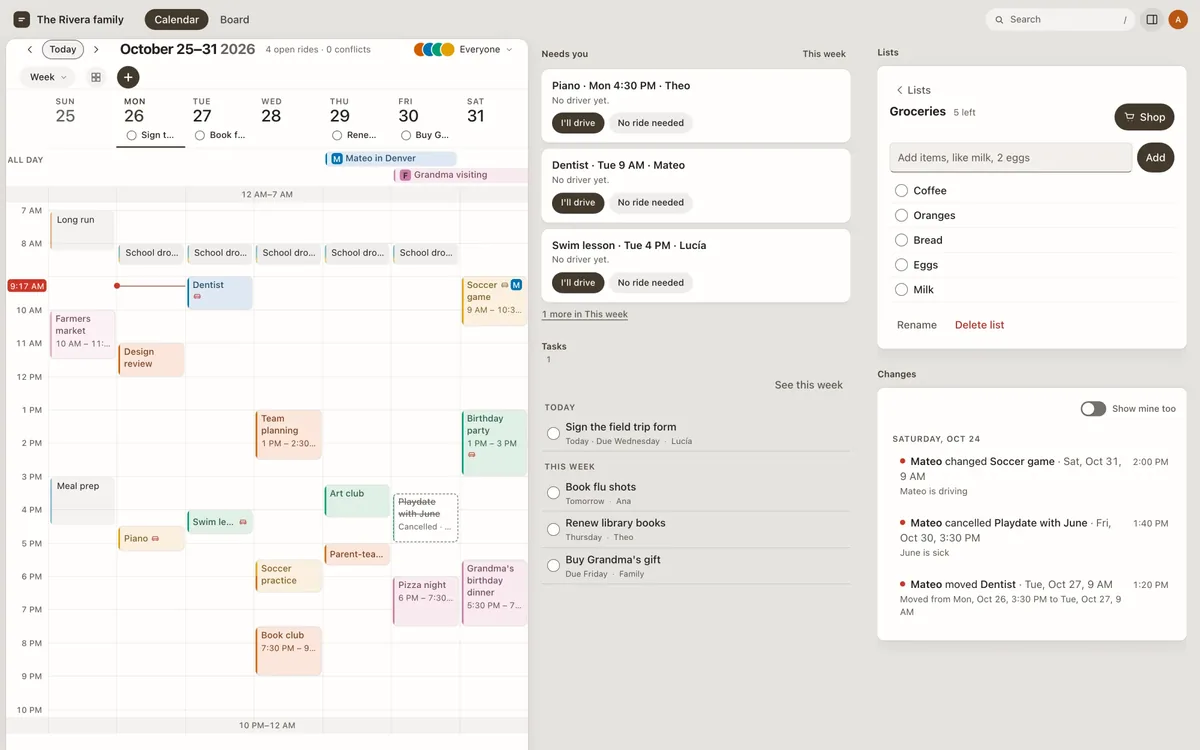
How Steady works for a family
- Everyone links their own Google Calendar.Changes made in Steady go back to Google, in the calendars you can edit. Calendars shared with you read only stay read only.
- One week for the whole family.Each person's events show in their color, so you can see who is where.
- School and team calendars come in too.Add the link a school or team gives you, and its events join the week.
- Rides nobody is driving yet.Say who's driving to each event. Steady points out the ones nobody is free to drive.
- Tasks and lists.To-dos for anyone in the family, on a day or due by one, and shared lists like groceries that whoever gets to it first can check off.
There's more on the home page, from birthdays to a board view for an old tablet.
Who it is for
- Parents who each keep their own Google Calendarand want one view of the family's week without giving theirs up.
- Families juggling school, practices and rideswho need to see everything in one place and who is driving.
- Grandparents and sitterswho need to see the plan, not change it. They can be invited to view only the people they look after.
Steady is new. Accounts are for people in the US, you must be 13 to have your own, and there's no Android app yet. The home page lists what isn't there yet.
Questions
Is Steady free?
Nobody is charged today, and Steady asks for no card. A paid plan isn't turned on yet. If it is, the Terms say how it works.
Does Steady replace Google Calendar?
No. Your Google Calendar stays where it is. Steady reads the calendars you choose and, in the ones you can edit, adds, changes and deletes events so both match. A calendar shared with you read only is only read. If you disconnect Google Calendar in Settings, the events that came from Google are removed from Steady, and events made in Steady stay.
Who can see what?
Each family's calendar is private: only the people that family invites can sign in to it or see what's on it. People invited to edit can change anything, invite and remove people, and delete the calendar. People invited to view see only the people chosen for them and can't change anything. An event marked private in Google comes in as Busy, with no title, notes or place. The one exception is a calendar feed link: anyone who has it can see the events in it.
How do partners and other family members join?
Whoever starts the calendar invites them with an invite link from Settings, under People, to edit or to view. They sign in with a passkey, so there's no password. Each person can then link their own Google Calendar.
Can I add my kids' school and team calendars?
Yes. Add the calendar's link, the one a school or team gives you for subscribing, and its events show in the family's week next to everyone else's.
Does Steady work on iPhone?
You can open Steady in your iPhone's browser. The iPhone app isn't in the App Store yet, and syncing the calendars on an iPhone comes with it.
What happens to my data?
Steady doesn't sell your data, use it for advertising, or show ads. It is stored on an encrypted disk at Fly.io in the US, and backup copies are deleted after 30 days. Your Google sign-in is stored encrypted and used for nothing else. Leaving a calendar deletes your passkeys, sessions and Google connection, and anyone who can edit can delete the whole calendar. Privacy has the full list.
Something else? Support is one email to a real person.
Ask for a place.
Request access and we'll email you when there's room. Or look around a sample week first.
Request access